


Guide the Investigation in STEM Clubs
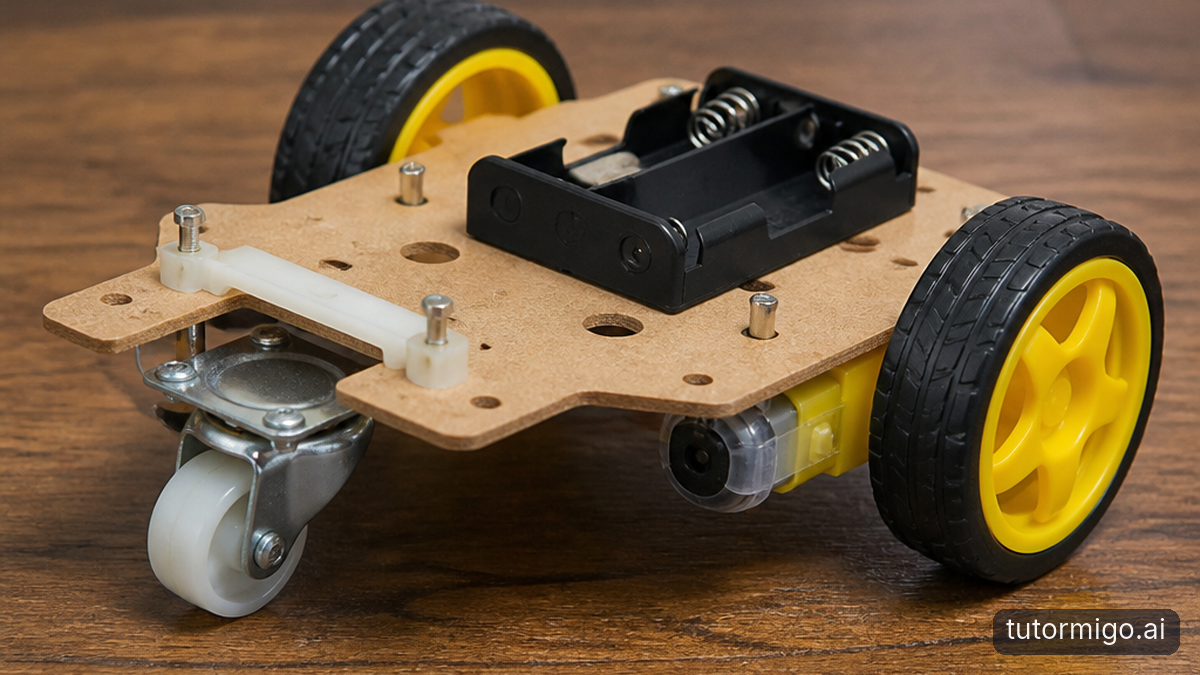
If you want to run a school STEM club, you do not need to know every programming language or explain every circuit from memory. Your most useful contribution is often making students’ thinking visible. Ask what they expected, what actually happened, and what evidence might explain the difference. Those questions give an uncertain team a starting point without taking ownership of its project.
Imagine a team whose wheeled project keeps veering left. One student blames the code; another wants to replace the wheels. Instead of choosing a winner, ask them to describe the behavior precisely. Does it happen on every surface? Does it begin immediately? Have they checked whether anything rubs against one wheel? You are turning competing guesses into questions the team can investigate.
Set boundaries with the club advisor before projects begin. Agree on approved materials, equipment supervision, and when students must stop and ask an adult. AI advice is not permission to modify batteries, bypass guards, or attempt an unsafe experiment. Your technical knowledge can grow alongside the students, but responsibility for a safe, welcoming session stays with the adults. That distinction makes volunteering more manageable and helps students retain responsibility for their reasoning.
Give Your AI Science Buddy a Clear Problem

The brief for Zera, your curious AI science buddy, is simple: help the team reason rather than hand over a finished project. TutorMigo.ai’s AI Tutor Workspace offers personalized tutoring chat and expert personas. Use that support as a subject-matter sounding board, not an unquestionable authority. A helpful explanation should lead students back to their observations and a testable next step.
For after-school robotics support, a specific question beats “Why doesn’t this work?” Have students explain the project’s goal, the symptom, and what they have already tried. They might ask: “Our wheeled project turns left on a smooth floor. We checked that both wheels rotate freely. What are three possible causes, and what safe observation would help distinguish them? Ask us a question before suggesting changes.”
Read the response together. If the AI Tutor suggests unequal wheel speeds, ask students what evidence would support that explanation. If it assumes a sensor the project does not have, correct the assumption. Keep private student information out of prompts, and follow your school’s rules for account access and supervision. This approach makes the volunteer a discussion leader: you help students evaluate explanations instead of presenting generated answers as established facts.
Use Real-World Science Examples to Make Ideas Click
Advanced projects often stall because students can repeat a term without recognizing it in their own design. Real-world science examples help bridge that gap. When wheels spin but a vehicle barely moves, ask your science buddy to connect traction with familiar experiences, such as shoes slipping on a polished floor. Then return to the actual project: which observations suggest slipping rather than a blocked axle?
Keep the analogy connected to a practical comparison. Students could test their approved wheeled project on two advisor-approved surfaces, keeping the starting position and other conditions consistent. Before testing, ask them to predict what will happen and explain why. Afterward, compare the observation with the prediction. A surprising result is useful evidence, not a reason to declare the experiment a failure.
Analogies also have limits. A shoe is not a motor-driven wheel, and changing a surface can affect more than one part of a system. Ask the tutor, “Where does this comparison stop being useful?” That question encourages careful reasoning. For a coding team, the same routine might compare repeated sensor checks with periodically checking an oven, then examine why a program’s timing requirements are different. Familiar examples should open the investigation, not replace it.
Choose a Study Tool That Matches the Sticking Point
A conversation is not always enough. When students disagree about what connects to what, a shared diagram can help more than another paragraph. TutorMigo.ai’s Study Tools Hub includes a whiteboard, code sandbox, and math step editor. Choose the tool that makes the current problem easier to inspect, rather than asking students to move their entire project into a new workflow.
For example, use the whiteboard to sketch the sequence from a sensor reading to a decision and then an action. Ask students to point to the stage where their observation differs from their expectation. If the confusion is about branching logic, a small, compatible example in the code sandbox can help isolate the decision being tested. Do not assume sandbox behavior proves that physical hardware will behave identically.
The math step editor can support a team working through a calculation behind its design. Have students explain each step and check that the quantities and units make sense before applying the result. You do not need to demonstrate every tool in one meeting. The practical difference from a chat-only workflow is the option to move between explanation, a diagram, a code experiment, and mathematical reasoning when the project calls for it.
Keep Learning From Disappearing Between Meetings
A weekly club loses momentum when every session begins with “What were we doing?” One of the most practical TutorMigo benefits is session history in the tutoring workspace. Students can revisit earlier discussions instead of relying entirely on memory. End each meeting by having the team state its current explanation, the evidence collected, and the next question it wants to investigate.
Do not assume the tutor automatically knows what happened at the workbench. Ask students to add a short, accurate update themselves: “We compared two surfaces. The wheels slipped on the smoother one. We have not checked whether the load changes the result.” At the next meeting, review that account against the team’s own notes. Continuity is strongest when students actively maintain it.
For recurring concepts, TutorMigo.ai’s spaced-repetition flashcards offer AI-assisted card creation and review scheduling. A useful card might ask why changing several conditions together makes a result harder to interpret. Keep decks small and check generated cards for accuracy. Parent Dashboard visibility into a child’s progress can support a conversation at home; educators can use Teacher Dashboard monitoring and reporting within their school’s setup. Neither replaces the team’s project log or the advisor’s direct observations.
Start With One Better Club Meeting
You do not need to redesign the club to try this approach. Choose one recurring difficulty for the next meeting: vague troubleshooting questions, forgotten findings, or students waiting for an adult to supply the answer. Agree with the advisor on how tutoring support will be used, then introduce a simple expectation: every request for help should include an observation and something the team has already tried.
During the session, let one student describe the problem while another checks the description for accuracy. Use the AI Tutor to explore possible explanations, choose one safe test, and ask the team to predict its result. Rotate those roles so the most confident speaker does not become the only person interacting with the tutor. Your aim is wider participation, not faster answer collection.
Close by asking each team what changed in its thinking and what evidence caused that change. Save a short update for next time, and note any question that needs the advisor’s expertise. If you want more guidance on staying involved without taking over, explore these ideas for more confident learning with an AI study buddy. Start small: one clear question, one useful explanation, and one student-led test can make your next club meeting more productive.
Frequently asked questions
Yes. Focus on organizing safe investigations, asking students to explain their observations, and involving the advisor when specialist judgment is needed. You do not have to supply every technical answer.
Check its assumptions against the actual project, compare explanations with approved references, and test safe predictions under supervision. Ask the advisor about uncertain or safety-sensitive advice.
No. It can help students inspect compatible code examples, but physical projects also involve hardware, power, friction, and other conditions that require supervised real-world testing.
Save the observed problem, tests attempted, results, and next question. Workspace session history can preserve tutoring discussions, while students should also maintain their own project notes.
Related reading
Enjoyed this read?
Like, share, or comment below.



Comments
0Sign in required · respectful discussion · replies supported
Loading comments…