


Set one clear goal for your first tutoring session
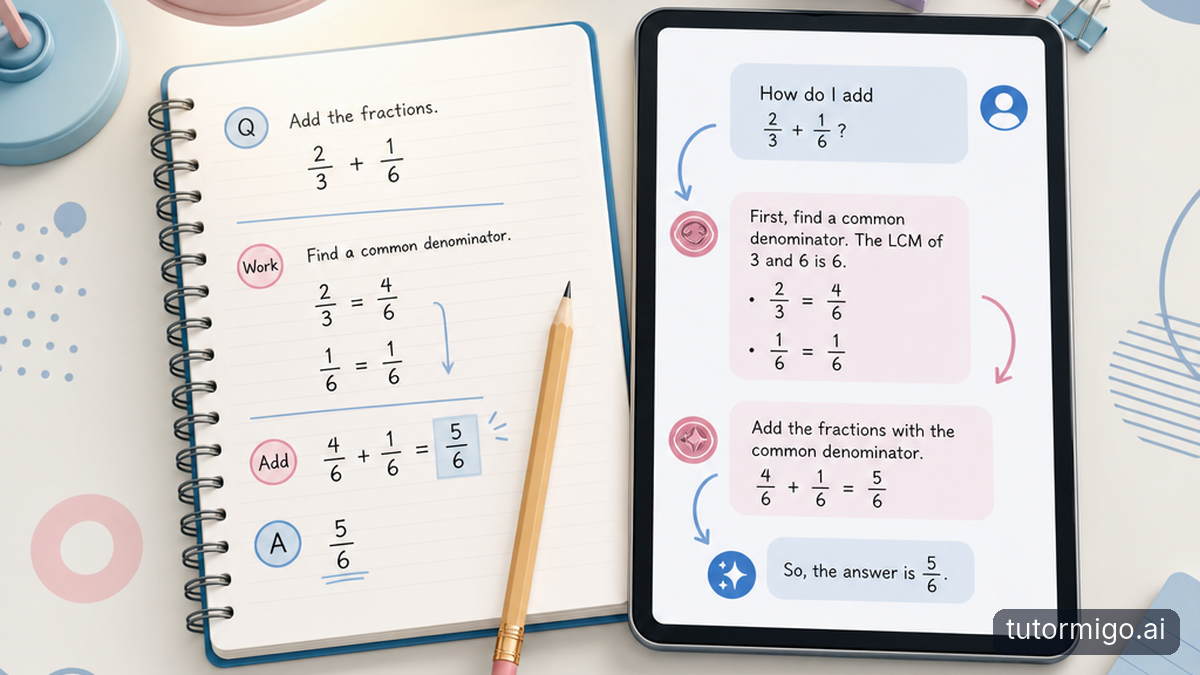
You do not need a polished study plan before you begin. Bring a question, a confusing concept, or an example of work you struggled with. Give your AI Tutor enough context to make the conversation useful: what you are learning, what you have already tried, and where your understanding breaks down.
For example, instead of asking, “Can you help with fractions?” try, “I can add fractions with matching denominators, but I get stuck when the denominators differ. Please explain one example, then let me try.” That gives the session a manageable target.
TutorMigo.ai offers personalized tutoring chat, expert personas, and session history. General-purpose chatbots can also explain concepts; the practical distinction is whether you want a dedicated tutoring workspace with study tools alongside it. Your first session is a chance to judge that fit.
Expect practice, not just an explanation
A useful first session should leave room for you to do some thinking. After reading an explanation, ask for a similar question and attempt it before requesting the answer. Explain your reasoning, including any uncertainty. This helps you distinguish between following a worked example and being able to use the idea yourself.
If an explanation feels too fast, tell your AI Tutor exactly where you lost the thread. You might say, “I understand the first step, but why does the next step work?” You can also request a simpler example rather than restarting the whole topic.
Choose an interactive tool when it suits the task. TutorMigo.ai's Study Tools Hub includes a whiteboard, code sandbox, and math step editor. You might sketch a diagram, test a short piece of code, or work through mathematical steps. You do not need to try every tool during your first visit.
Turn the session into a realistic review plan
Before you finish, identify what needs another look. Separate facts you need to remember from skills you need to practice. A definition may suit a flashcard; explaining an argument or solving an unfamiliar problem usually needs a fuller practice task. This keeps your follow-up work connected to the difficulty you actually encountered.
TutorMigo.ai offers spaced-repetition flashcard decks with AI-assisted card creation and review scheduling. Start with a small, focused deck rather than collecting everything from the session. For example, review a few unfamiliar terms, then use those terms in your own explanation. This guide to flashcard study with TutorMigo.ai or a chatbot explores that distinction further.
If your goal is SAT, ACT, AP, or IELTS preparation, structured exam prep provides practice sets and progress tracking. Keep your first session focused on one relevant skill instead of trying to cover an entire exam.
Decide what progress should look like
Your first session is a starting point, not proof that you have mastered a topic. Look for something observable: can you explain the idea without rereading the answer, complete a similar task, or describe the mistake you were making? “I now know which step confuses me” is also useful progress when you arrived feeling completely stuck.
If you are a parent, agree on a small goal with your child before the session and ask them to explain one thing afterward. The Parent Dashboard offers visibility into child progress, learning controls, and co-learning features. Keep the conversation focused on understanding rather than simply finishing work.
If you are a teacher, the Teacher Dashboard supports student monitoring and reporting, alongside class management and knowledge base assignment. Use that visibility to guide a follow-up question, while checking understanding through the learner's own explanation or independent work.
What to do next: leave yourself a clear restart
End by writing a brief note in your own words: what you worked on, what makes sense now, and what still needs practice. For example: “I can explain the rule, but I still need help choosing when to use it.” That is a more useful starting point for another session than “study this again.”
TutorMigo.ai's session history lets you revisit the earlier conversation. When you return, use it to locate the explanation or question you want to build on, then state your next goal explicitly. You do not have to rely on remembering every detail or assume that an earlier answer settled the topic.
For now, choose one question, allow enough time to attempt it yourself, and finish with one review action. A successful first session gives you both a clearer understanding and a practical reason to return.
Frequently asked questions
Bring one question or confusing example. A short explanation of what you have tried is enough to get started.
Point to the confusing step and ask for a simpler example. Then try explaining the idea back in your own words.
Yes. TutorMigo.ai includes session history in the tutor workspace, so you can revisit the conversation before continuing.
No. Choose the tool that matches your task, and add others only when they help you practice or review.
Look for understanding, not just a finished session
Your child has finished a first tutoring session, but you may still wonder what actually helped. A parent dashboard gives you visibility into progress; the next step is turning that information into useful support at home. Start with a small check of understanding, rather than a longer list of tasks.
Ask your child to show you one thing that makes more sense now. Keep the invitation specific and low-pressure: “Can you show me how you would start a question like that?” is easier to answer than “Did you understand everything?” Let them use their notebook if needed, then notice which parts they can explain without help.
For example, your child might say that fractions feel easier after working with an AI Tutor. Instead of setting another worksheet immediately, ask them to explain why the denominators need attention. If they can describe the reason but still make a calculation mistake, you have identified a different need from not understanding the idea at all.
TutorMigo.ai's Parent Dashboard offers visibility into child progress. Use that visibility alongside your child's explanation, not as a substitute for it. A completed activity and a confident explanation can tell different stories. Your aim is to find the next useful question, not to turn the first session into a verdict on ability.
Make the parent dashboard a conversation starter
Decide when you will look at progress together, rather than checking repeatedly throughout the evening. A brief conversation after a session, or at an agreed point later in the week, can make the parent dashboard part of a predictable routine. Tell your child what you are trying to learn: which ideas are becoming clearer and where support is still needed.
Begin with their account before offering yours. You could ask, “What felt easier today?” followed by “Where did you still need help?” If their answers seem different from what you expected after reviewing progress, treat that difference as something to explore. They may have completed familiar work comfortably but struggled when the question changed slightly.
Imagine your child says a session went badly because they needed several explanations. You might have noticed that they stayed with the topic and eventually explained the first step independently. Both observations matter. Say, “It sounds like that was frustrating, and you also found a way to get started. What made that part clearer?”
Keep comparisons focused on your child's earlier attempts, not a sibling's pace or an imagined ideal. Useful progress might mean needing a smaller hint, spotting a familiar mistake, or asking a more precise question. Those details give your next conversation somewhere practical to go, even when the whole topic is not secure yet.
Pair parent controls with clear family agreements
TutorMigo.ai's Parent Dashboard includes learning controls and co-learning features. Treat those controls as one part of your home learning agreement, rather than expecting settings alone to establish a routine. Explain any controls you choose to use in plain language, and connect them to a shared purpose: making space for focused practice and knowing when to ask for help.
Keep the agreement concrete. You might decide together that each session starts with one question, includes an independent attempt, and ends with a brief explanation of what changed. These are family expectations, not claims about automatic platform enforcement. Agree on them before your child is tired or frustrated, when it is easier to discuss what feels reasonable.
Clarify your own role, too. For example: “I will help you choose a starting point, but I will not sit beside you checking every answer.” If your child wants company, agree that you will stay nearby for the beginning and then step back. Support can be available without becoming constant supervision.
Revisit the arrangement when it is not working. If your child hides confusion because they expect extra work whenever they struggle, say explicitly that asking for help will not automatically lead to a longer session. Controls work best within a relationship where your child understands the boundaries and feels safe telling you what is difficult.
Build a routine small enough to repeat
A useful home routine should fit an ordinary evening, not only a quiet day when everyone has energy. Choose a dependable cue, such as after a snack or before packing away school materials. Then give the session a narrow purpose. “Practise explaining one unfamiliar word” is a clearer starting point than “catch up on everything.”
Use a simple pattern: choose the question, allow an attempt, and finish with a short reflection. You do not need to watch every exchange with the AI Tutor. Your child can bring you the question they tried and explain where help was useful. TutorMigo.ai's tutor workspace includes session history, which lets them revisit an earlier explanation when deciding what to practise next.
For example, if yesterday's difficulty was understanding a word problem, today's goal might be identifying what a similar question is asking before doing any calculations. That keeps the follow-up connected to the actual difficulty. Repeating a whole session may add work without addressing the sticking point.
Leave room for a lighter version on demanding days. One careful attempt and an honest explanation can be more useful than a long, distracted session. Agree on a stopping point before you begin. A routine that ends predictably is easier to return to than one that keeps expanding whenever a mistake appears.
Respond to struggle without taking over
When your child gets stuck, first try to identify the kind of difficulty. Do they not understand the explanation, not know how to begin, or feel too frustrated to attempt the task? Those situations need different responses. Asking “Which part feels difficult?” gives you more useful information than repeating “Just try.”
If the explanation is the problem, help your child form a specific request: “Please explain why that step works using a simpler example.” If starting is the problem, ask them to describe only the first action they would take. If frustration is taking over, pause before adding another question. A short break is not evidence that the learning has failed.
Resist answering immediately when a little thinking time might help. You can say, “I will give you a moment, then we can decide what help you need.” Notice concrete actions afterward: your child reread the question, identified a confusing word, or corrected a mistake. The guide to building learning confidence one problem at a time offers a useful way to think about these small gains.
AI explanations can also contain mistakes, so do not assume every disagreement means your child misunderstood. Compare a doubtful explanation with their learning materials. If the same difficulty persists across sessions, share a specific example with their teacher rather than relying on a general description such as “They are struggling.”
What to do next: agree on one follow-up
For your next check-in, choose just one question to answer together: what should your child be able to do with a little less help? Make the answer observable. They might explain a term in their own words, identify how to start a familiar task, or describe the mistake they now know to watch for.
Review the parent dashboard with that question in mind, then invite your child to show you an example. Avoid adding several new targets because you notice several areas that need work. Choosing one priority makes it easier to see whether your support is helping and keeps the next session manageable.
Write a short restart note together if that would help: “Next time, I will try a similar question before looking at the explanation.” Keep it in your child's words. When they return to the tutor workspace, they can use session history to find the earlier conversation and state that goal clearly.
Finish by confirming your part of the plan. Perhaps you will provide a quieter place, listen to an explanation afterward, or help decide when to pause. The aim is not to monitor every moment. It is to give your child a dependable routine, a manageable next step, and enough space to become more independent.
Enjoyed this read?
Like, share, or comment below.


Comments
0Sign in required · respectful discussion · replies supported
Loading comments…