


Make invisible structures easier to picture
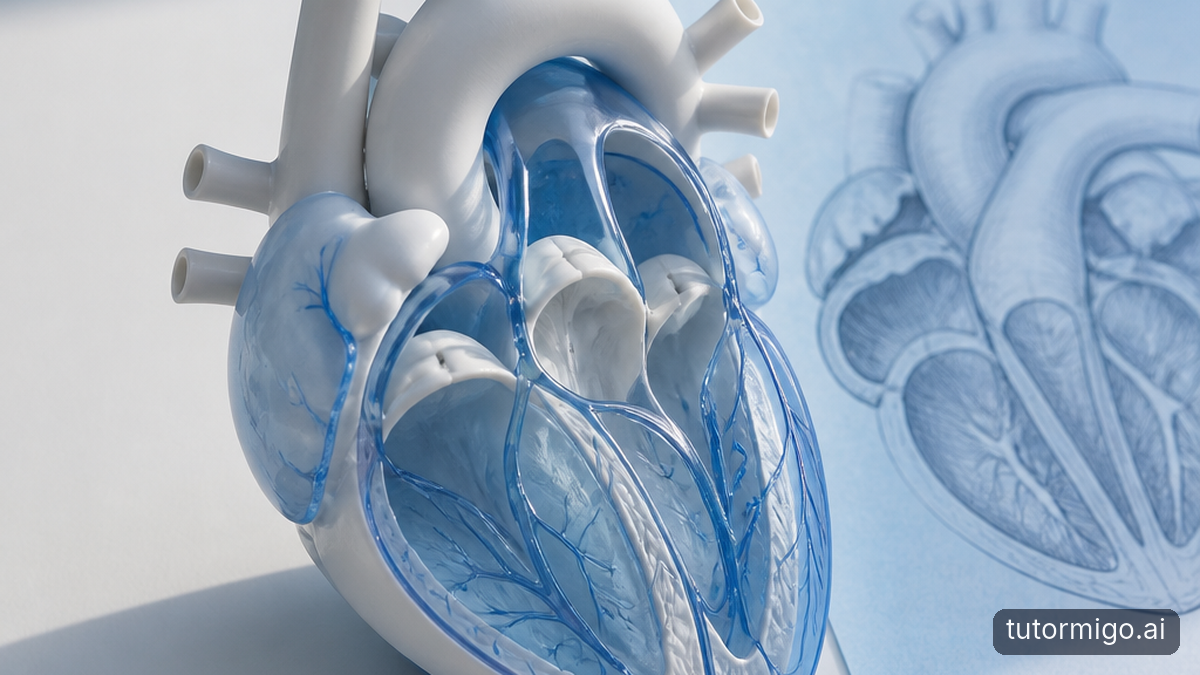
A flat diagram asks you to do considerable mental work. You must imagine depth, recognize which structures sit behind others, and work out how separate views connect. A well-designed 3D educational lesson can make those relationships easier to inspect. Instead of treating anatomy as a page of labels, you can explore how its parts fit together.
Consider the heart. In a suitable interactive model, changing your viewpoint can help you distinguish its chambers and trace the vessels entering and leaving them. The useful question is not simply, “What is this part called?” It is, “Where does blood go next, and why?” The model gives your explanation a physical reference point.
The same approach helps in cell biology. A cutaway model can show the nucleus within the cell and the membrane around it. But realistic detail is not always better: too many textures and structures can obscure the relationship you need to understand. Start with a simplified view, focus on one process, and add detail gradually.
After exploring, look away and sketch the arrangement from memory. Your sketch does not need to be beautiful. Its purpose is to reveal whether you understand the relationships without relying on the model.
Turn visual demonstrations into predictions

Watching something move can feel like understanding it. The stronger test is whether you can predict what happens next. Interactive experiences become more useful when you make a choice, explain your reasoning, and compare your prediction with an observable result. That turns an attractive demonstration into a thinking exercise.
Imagine a demonstration of particles moving at different temperatures. Before changing the temperature, describe what you expect to see. Then observe the movement and explain whether it matches your prediction. Remember that the display is a model: its colors, particle sizes, and motion may be simplified to highlight a particular idea rather than reproduce every physical detail.
In biology, try the same routine with a demonstration of diffusion. Predict how particles will spread when there is initially a greater concentration in one region. Watch what changes, then explain why particles continue moving even after they become more evenly distributed. That final question exposes a common misunderstanding: an even distribution does not mean motion has stopped.
If you are a parent or teacher, resist explaining the result immediately. Ask, “What did you expect?” and “What would you change to test that explanation?” Those questions keep the learner actively involved rather than simply following your narration.
Connect 3D exploration with TutorMigo.ai
When comparing TutorMigo.ai benefits, distinguish the learning method from the platform’s verified features. The supported feature list includes personalized tutoring, session history, flashcards, and interactive study tools; it does not establish a built-in 3D lesson viewer. Use the examples here as ways to connect a separate 3D resource with TutorMigo.ai, not as a promise of native 3D simulations.
For example, explore a heart model, then open the AI Tutor Workspace and describe the part you found confusing: “I can identify the chambers, but I mix up the route through the lungs. Ask me one question at a time.” A Tutormigo.ai can help you work through the explanation conversationally while you keep the model available as a reference.
The interactive whiteboard offers another way to work through the idea. Sketch a simplified route, use arrows to connect stages, and compare your drawing with a trusted reference. You do not need a realistic rendering; a clear diagram can expose a missing connection more effectively than another minute of looking.
Session history gives you a record to return to when you revisit the topic. For more context on the available tools, explore TutorMigo.ai’s interactive learning features.
Use flashcards to keep the understanding
A memorable demonstration can make an idea click today without making it easy to recall next week. That is where spaced repetition complements visual learning. After exploring a model or diagram, identify the few relationships you want to remember and turn them into questions that require you to retrieve an explanation.
TutorMigo.ai’s Flashcards feature supports spaced-repetition decks, AI-assisted card creation, and review scheduling. Start with your learning goal rather than collecting every visible label. After studying a cell, useful prompts might include, “How does the cell membrane help regulate the cell’s internal environment?” or “Why do cells need both instructions and structures that carry them out?”
Mix identification questions with reasoning questions. Naming a structure checks vocabulary; explaining its role checks whether the label means anything to you. For a heart lesson, ask yourself to describe the route of blood through the heart and lungs without viewing the diagram. Then check your answer against an accurate source.
When an answer breaks down, return briefly to the relevant visual instead of rereading the entire topic. Correct the specific misunderstanding, close the reference, and try explaining again. This creates a practical cycle: inspect, explain, retrieve, and revisit. The visual supports understanding; retrieval tests whether you can use it independently.
Compare tools by the learning they support
A general-purpose chatbot can also explain diffusion, suggest questions, or help you reason through a diagram you describe. The practical comparison is not whether a tool can produce an explanation. It is how well its available workspace supports the learning routine you want: exploration, questioning, review, and a clear way to return later.
With TutorMigo.ai, consider whether personalized tutoring chat, session history, scheduled flashcard review, and the interactive whiteboard fit that routine. An AI Tutor is most useful here as a questioning partner, not as an unquestionable authority. Check important scientific claims against reliable course materials, especially when an explanation seems inconsistent with the model or demonstration.
Parents can use the Parent Dashboard for visibility into a child’s progress and available learning controls. Pair that visibility with a simple conversation: “Show me one relationship you understand better now.” A learner’s explanation can reveal something that activity alone cannot.
Teachers can use the Teacher Dashboard’s student monitoring and reporting alongside their own checks for understanding. Ask learners to predict a result or redraw a process without the original visual. Whether you are supporting someone else or studying independently, look for clearer explanations and better transfer—not merely more time spent interacting with a tool.
Try one visual learning cycle next
Choose one science question you currently find difficult, such as how substances move across a cell membrane. Keep the goal narrow enough to explain in a few sentences. Find a reliable diagram, demonstration, or 3D lesson that addresses that question directly, rather than starting with the most elaborate resource you can find.
Before exploring, write down what you think happens. During the activity, focus on one relationship: what moves, where it moves, and what influences that movement. Pause when something contradicts your prediction. That moment of confusion is useful because it gives your next question a precise target.
Next, describe the confusion in TutorMigo.ai’s tutoring workspace. Ask for a step-by-step explanation or a question that tests your reasoning. Use the whiteboard if a simple sketch would help. Then close the visual and explain the process aloud, using everyday language before adding scientific vocabulary.
Finish by making a few flashcards about the relationships you almost missed, and return to them through scheduled review. On your next session, try a slightly different example. If you can explain the new case without copying the original demonstration, you have a stronger sign of understanding. Start with one question; let the visual, conversation, and review each do a different job.
Frequently asked questions
The verified feature list does not establish a built-in 3D viewer. You can use separate 3D learning resources alongside its tutoring workspace, interactive whiteboard, and flashcards.
No. Use 3D when depth and spatial relationships matter. A simplified diagram may be clearer for tracing a process or focusing on one connection.
Hide the resource and explain the idea, sketch the relationships, or predict a new example. Independent explanation is a better check than familiarity with the display.
Explore TutorMigo
Enjoyed this read?
Like, share, or comment below.


Comments
0Sign in required · respectful discussion · replies supported
Loading comments…